Permissions
Connection permissions allow you to control which users and groups are allowed to use the connection. If a user or the group to whom the user belongs is not explicitly granted permission to use a connection, the user will not be allowed to connect to the respective back end system.
Permissions are configured on the Add/Edit Connection screen:
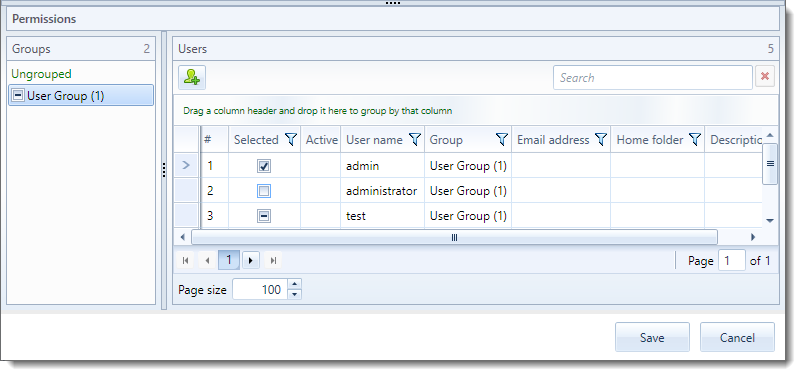
Permission is granted or denied to users or groups through the check boxes next to the user or group. The check boxes have three states namely “Checked”, “Unchecked” and “Undefined”. When the check box has a check mark such as the “admin” user in the screen shot above permission is granted. If the check box has no mark such as “administrator” permission is denied. If the check box has a horizontal line such as “test” then permission is neither granted nor denied and the permission set on the group level is applied.
In the screen shot above you will notice that the permission of both “User Group (1)” as well as “test” is undefined. In this scenario the “test” user will not be able to connect to the back end system since permission has not been granted to either the user or the group.
User level permission supersedes group level permissions. The “admin” user above will be able to connect while “administrator” will not regardless of whether permission has been granted or denied on the group level.