Value Displayed and Value Returned
For the purposes of the discussion to follow let us assume you have the following “Customers” database table:
| Id | Name | Surname | CustomerNumber | ContactNumber |
|---|---|---|---|---|
| 1 | Sally | Jones | SJ00000123 | 123-456-7890 |
| 2 | Donald | Smith | DS00000124 | 321-654-0987 |
Relational database tables records usually have a unique number that identifies each record in the table. This number is called the primary key. In the table above the primary key is called “Id” and as you can see it is just an incrementing number. When a record is added to the Customer table, the database engine will automatically insert a new unique Id for the record (assuming that the table was designed to do this). Whenever a reference needs to be made to a customer in another table, say Orders, only the Id of the customer would be needed. Knowing the Id of the customer record is enough to uniquely identify the customer. We could also use the CustomerNumber field as it would also be unique but it is a bigger value and therefore inefficient to deal with in other tables. There are other reasons why you would not typically use the CustomerNumber field as a reference in other tables but those are beyond the scope of our discussion here.
Now, if a ScannerVision template requires the user to select a customer from a list we want to present the user with a list that contains the customer name, surname and possibly the telephone number or even the CustomerNumber. We need to be sure that the user is given enough information to be able to uniquely identify the customer. If we have two customers called “Donald Smith” we need to present the user with more information in order to distinguish between them. The important thing to understand is that whatever combination of fields from the Customers table we present to the user, that is not what we want to return to ScannerVision when the user submits the document. We want to return the customer’s Id. So there is a distinction between what information we want to show to the user and what information we want to return to ScannerVision.
ScannerVision gives us the ability to make this distinction with SQL, PowerShell/C#, VBScript/JScript and XML picklists. In the screen shot below you can see an example of how we could construct the solution we discussed above. We know we need to select enough information from the Customers table to present to the user as well as the Id of the record. So we are going to need the “Id”, “Name”, “Surname” and “CustomerNumber” columns but we need to return only two columns in the result set of the query we execute. The one column must be the Id and the other a combination of the “Name”, “Surname” and “CustomerNumber” columns. To do this we are going to concatenate the “Name”, “Surname” and “CustomerNumber” fields and call it “Customer”. We will also add some formatting to the data by putting in spaces and brackets where appropriate to improve readability.
Here is a screen shot of the SQL picklist editor and the SQL query:
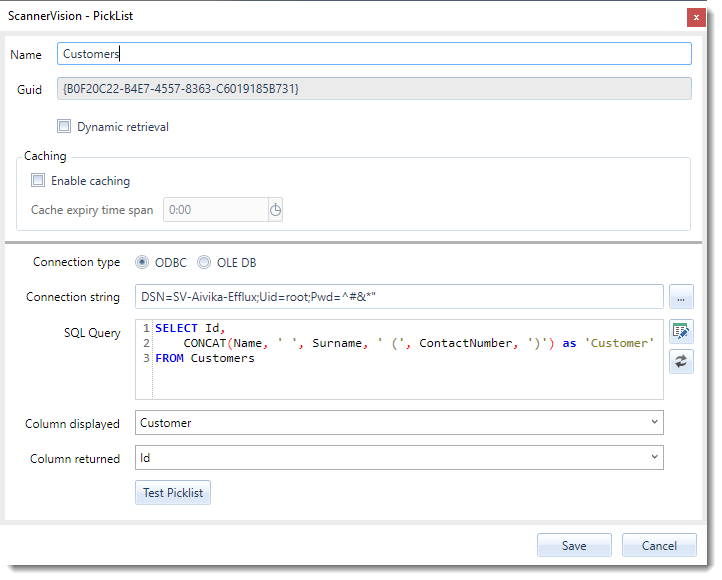
Notice that we have selected the “Id” column in the “Column returned” drop down list and the “Customer” column in the “Column displayed” list.
When we execute this query by pressing the “Test Picklist” button we get the following results:
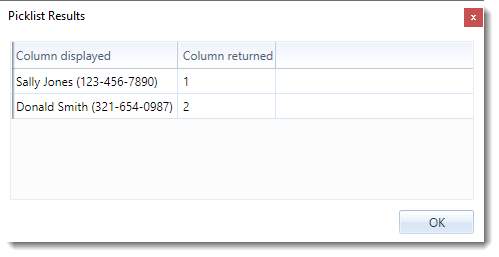
Make sure that the column displayed and column returned show the correct data.