Full Document OCR
ScannerVision offers two OCR engines namely Nuance Omnipage and Leadtools Advantage with the former being the default. You may find that the accuracy and speed of the two engines may differ in your environment so choose the one that best suits your needs.
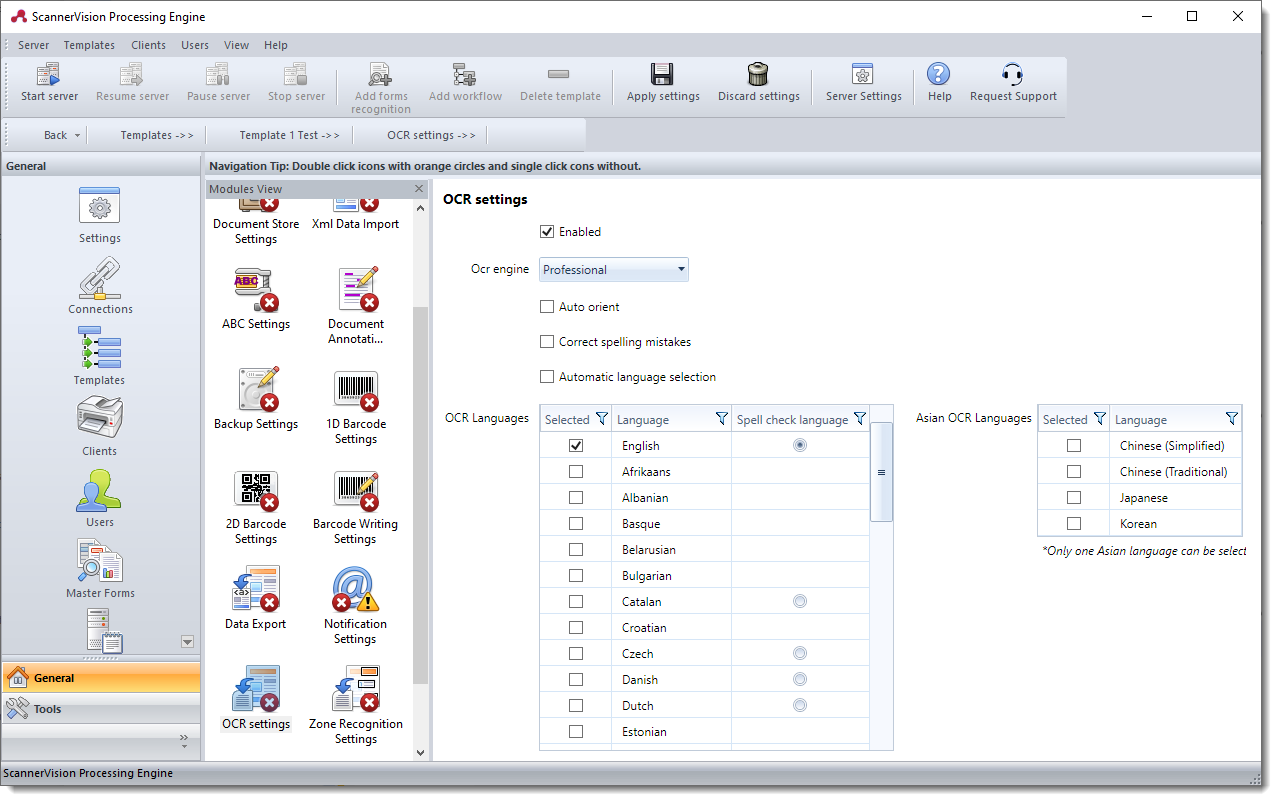
Enabled
Enables/disable the OCR engine. OCR has to be enabled for certain output document types such as Searchable PDF and PDF/A.
OCR Engine
Selects the OCR engine to use. The choice you make here will depend on your particular requirements. The engines do not support the same languages and you may find that the one performs better in your environment than the other. The default engine is “Professional”. You will notice that as you change the OCR engine the list of OCR languages also changes.
Auto orient
Automatically rotates the page being OCRed to the upright position if it is rotated.
Note: OCR does not need to be enabled for this setting to work, it can be enabled independently from OCR.
Correct spelling mistakes
Automatically correct spelling errors based on the language you have selected in the “OCR Languages” grid’s “Spell check language” column. There can be only one spell check language even if multiple OCR languages are selected. This will be explained in more detail below.
Automatic language selection
Automatically detects the language of the text being OCRed. When you select this option all the languages in the “OCR Languages” grid are selected and the ability to select/deselect languages becomes disabled. When the option is deselected the language selection of the saved template is loaded.
If you want an Asian language to be included in the language selection, you have to select it explicitly since only one Asian language can be used at a time.
OCR Languages
The languages that are supported by the OCR engine. These are different for the different OCR engines. The languages that you select helps the OCR engine to recognize characters. For example, if you choose English only then the engine knows that if it encounters a character that could be either of 2 or more possibilities but only one exists in the standard English character set, it will choose that character. In addition, if you also select English to be the spell check language, the OCR engine can go one step further and verify that the words it has recognized form part of the English language. If for example the engine recognizes a character that could either be a zero or the letter “o” it will look at the context of the character. If the character forms part of a word that exists in the language, the engine will choose the character “o” instead of the number “0” (zero).
| Language | Advantage Engine | Professional Engine | ||
|---|---|---|---|---|
| Arabic | Character Set | Spell Check | Character Set | Spell Check |
| English | X | X | X | X |
| Afrikaans | X | |||
| Albanian | X | |||
| Basque | X | |||
| Belarusian | X | |||
| Bulgarian | X | X | ||
| Catalan | X | X | X | |
| Chinese (Simplified) | X | X | ||
| Chinese (Traditional) | X | X | ||
| Croatian | X | |||
| Czech | X | X | X | |
| Danish | X | X | X | |
| Dutch | X | X | X | |
| Estonian | X | |||
| Faroese | X | |||
| Finnish | X | X | X | |
| French | X | X | X | X |
| Galician | X | |||
| German | X | X | X | X |
| Greek | X | X | X | |
| Hungarian | X | X | X | |
| Icelandic | X | |||
| Indonesian | X | X | ||
| Italian | X | X | X | |
| Japanese | X | X | ||
| Korean | X | X | ||
| Latvian | X | X | ||
| Lithuanian | X | X | ||
| Macedonian | X | |||
| Norwegian | X | X | X | |
| Polish | X | X | X | |
| Portuguese | X | X | X | |
| Brazilian Portuguese | X | X | ||
| Romanian | X | X | ||
| Russian | X | X | X | |
| Serbian - Latin | X | |||
| Serbian - Cyrillic | X | |||
| Slovak | X | X | ||
| Slovenian | X | X | X | |
| Spanish | X | X | X | X |
| Swedish | X | X | X | |
| Turkish | X | X | X | |
| Ukranian | X | X | ||
Asian OCR Languages
Asian languages are supported by the “Advantage” and “Professional” engines. Only one Asian language can be selected at any given time - including for “Automatic language selection” - and no spell check support is available.