Barcode Ordering
The barcode engine sorts the barcodes that it has read based on the setting chosen - on a per symbology basis. So, when you configure barcodes make sure that the order in which the symbologies appear on the ScannerVision Bacode Settings screen is the same as what the barcode engine would return.
The different options are:
- Top to Bottom
- Left to Right
- Legacy
Legacy is the default setting and will be applied when upgrading or importing templates from older versions. Legacy will read barcodes from left to right then top to bottom.
If you have barcodes as is shown below, EAN-13 on the left and EAN-8 on the right:
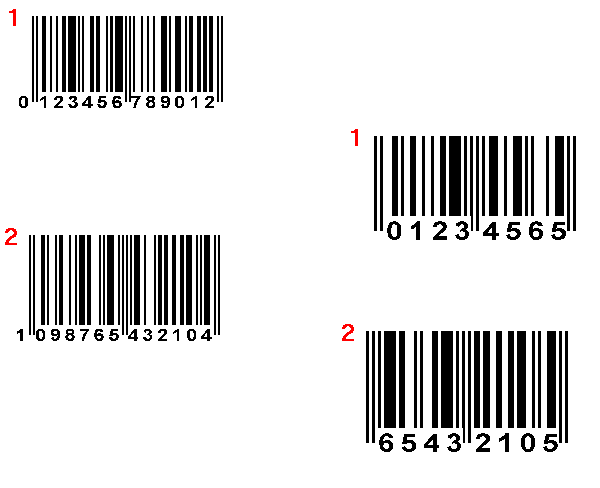
the barcode engine would read them as follows
Top to Bottom:
EAN-13 - 1, 2
EAN-8 - 1, 2
Left to Right:
EAN-13 - 2, 1
EAN-8 - 2, 1
Legacy:
EAN-13 - 2, 1
EAN-8 - 2, 1
In the above, the second barcode for both symbologies falls before the first barcode when read from Left to Right or using Legacy settings. As such, these barcodes will be picked up first and assigned to the first available symbology that is configured for these barcode types.
You can configure the EAN-13 symbologies first and the EAN-8 symbologies after that or even in between the EAN-8 symbologies as long as EAN-8 and EAN-13 symbologies respectively are in the correct order.
It is recommended that the Barcode order direction setting be configured to accommodate for the expected flow of multiple barcodes on a page.