File System Connector
The Windows File System Connector allows documents to be stored in a local system folder or on a network share. You can use the connector in either of two modes namely “Legacy” and “Version 8”.
Legacy
Legacy mode means that you will use the connector like earlier versions where you explicitly provide the full “Share/Folder Name”, “Login Name” and “Password” in the connector settings. You could use this method where you know you are going to use the particular connector configuration only once. If on the other hand you are going to need to upload documents with multiple connector instances to the same folder or network share, whether in the same template or different templates, you would be better served by using the “Version 8” connection type.
Version 8
In this mode you can use a Connection instead of having to provide the full “Share/Folder Name”, “Login Name” and “Password” for every instance of the connector you create. With Connections you can centrally manage Folders/Shares and connection credentials.
The Windows File System Connector connection screen is shown below:
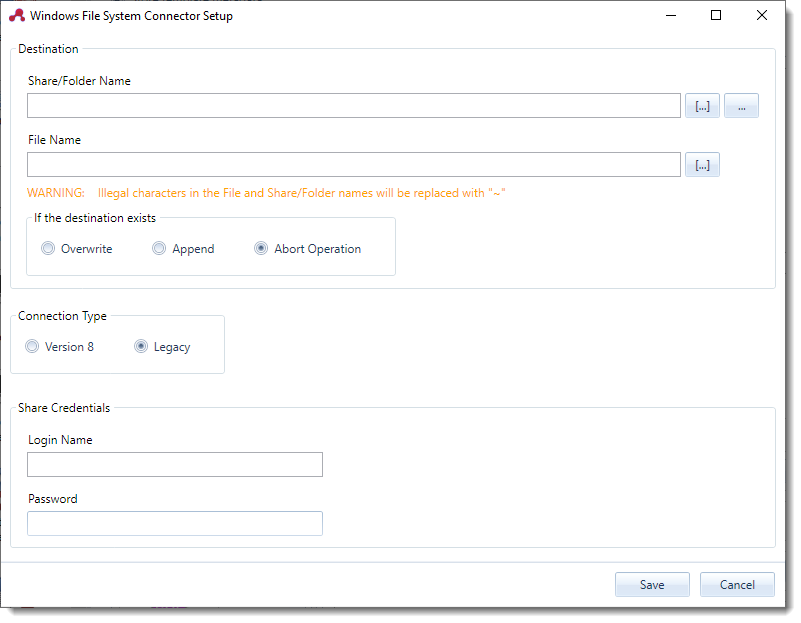
Anywhere that you see the “[…]” button you can make use of ScannerVision metadata tags.
Share/Folder Name
The path to the shared drive or folder name.
File Name
The file name of the document that is stored in the share or folder. There are several ways to generate file names dynamically. See Appendix H - Unique Suffix for details.
If the destination file exists
The file name already exists in the destination folder/share you have three options to handle the situation.
- Overwrite
- Append (Tiff and PDF only)
- Abort Operation
If the [UNIQUESUFFIX] tag is used in the file name none of these options apply.
Connection Type
See above.
Share Credentials (Legacy)
If documents are to be stored in a network share that requires authentication the login name and password is specified here.
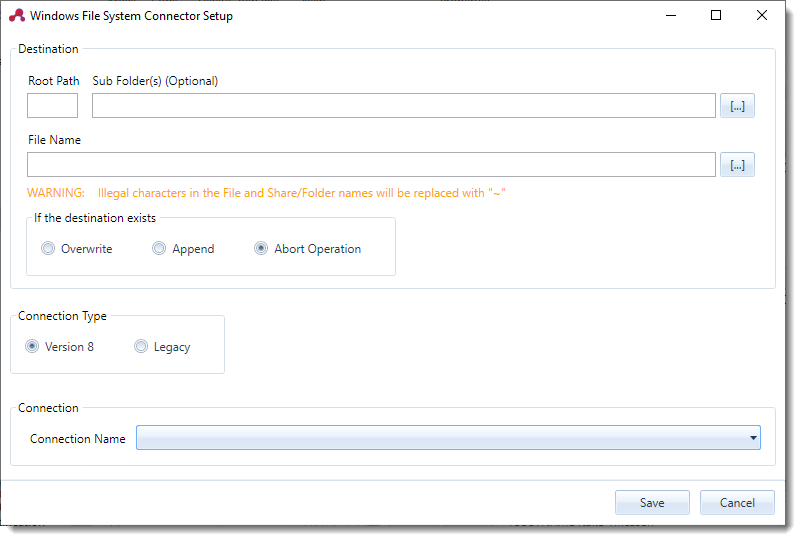
Connection Name (Version 8)
The name of the Connection to use.
Published tags
The File System connector publishes the following tags:
| Tag Name | Description |
|---|---|
| WFSFILENAME | The file name of the document that is stored by the connector excluding the path. |
| WFSFILENAMEWITHPATH | The file name of the document that is stored by the connector including the path. |
In addition to the tags above you will see the same tags with a number appended to the end in the ScannerVision Expression Editor as shown below:
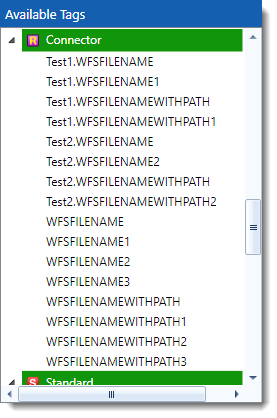
The numbered tags have been superseded by the Instance Name of the connector and it is recommended that you don’t use them.
Illegal characters
The Windows File System Connector has the ability to dynamically identify illegal characters in file and directory names. Any illegal characters that are identified are stored to disc for future reference.