Context Menu
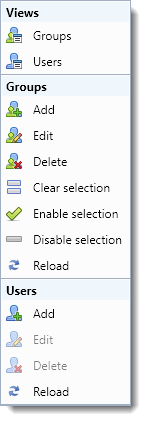
The “Groups” context menu is shown below:
Views
The views section lets you change the view to “Groups” or “Users”. See Managing User.
Groups
- Add/Edit
Adds a new user group or edits the selected group respectively. - Delete
Deletes all the groups. Deleting a group does not delete the users who are assigned to the group also. If all the groups that users belong to are deleted the users will become ungrouped. - Clear selection
Clears the selection of the "Groups" list. - Enable/Disable selection
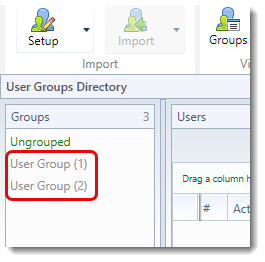
Enables/Disables all selected groups. Disabled groups appear grayed out in the Groups list:
- Reload
Reloads all groups from the database.
Users
- Add/Edit/Delete
Adds a new user or edits/deletes the selected users respectively. - Reload
Reloads all users in the selected group(s) from the database.